
Send broadcasts from your Telegram bot
Announce what’s new, send offers to selected customers, and remind attendees about upcoming events. Write the message in Cordo and see who received it.
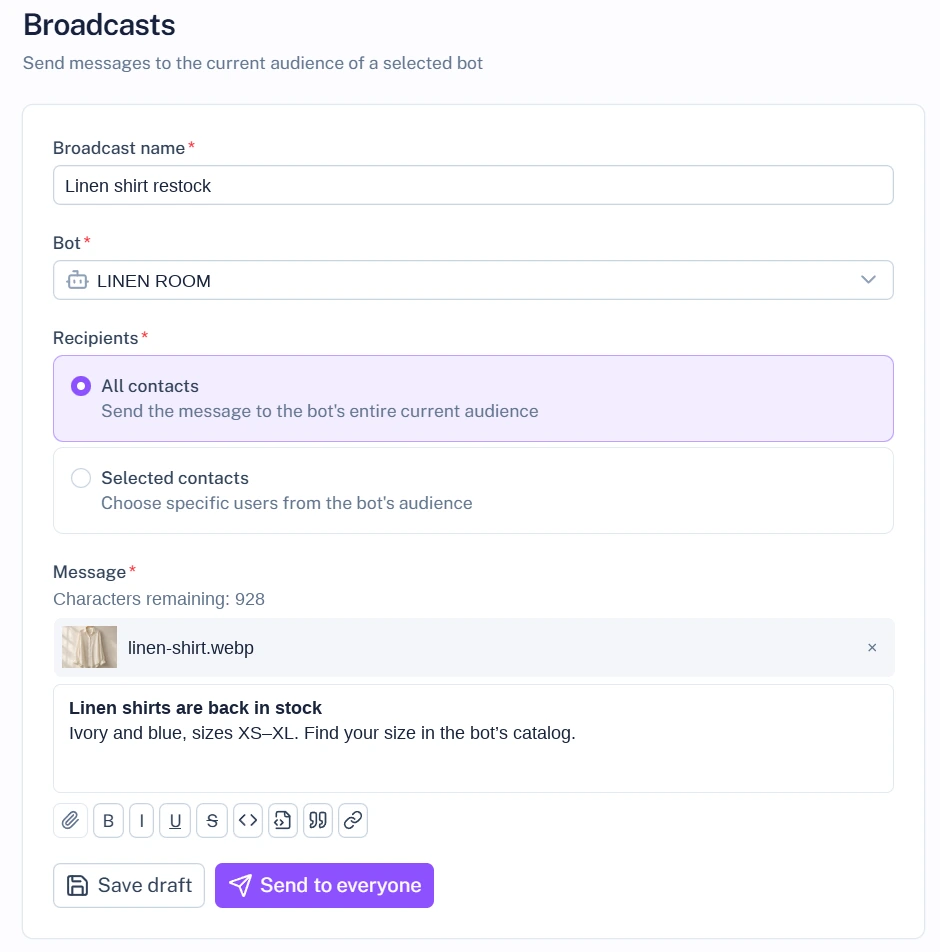
 LINEN ROOM bot

Segment your audience
Keep track of what matters to each shopper in their contact card: their size, favorite color, or city. When you have an offer that fits, you’ll know who to tell.
Open AudienceSend each group a different offer
Send a class reminder to students enrolled in the course, or invite subscribers in the right city to a seminar.
By tag
Remind only the students enrolled in that course about a class.
Tag: B1 English Telegram English Practicebot
By profile field
Invite only subscribers in Almaty to an in-person seminar.
City: Almaty Telegram Business Practicebot


Send broadcasts on a schedule
Prepare your broadcast in advance and let Cordo send it at the right time. Announce a launch, remind shoppers about a fitting, or share new arrivals every week without sending each message manually.
For example, every Monday at 10 am, LINEN ROOM shoppers can get a selection of new arrivals in their size.
Check what happened after sending
Broadcast history shows how many messages were delivered. Open a broadcast to see which recipients got the message and where delivery failed.
Broadcast FAQ
Can I message any Telegram user?
No. You choose recipients from the connected bot’s audience. The recipient needs to have started the bot and must not have blocked it.
What’s the difference between a draft and a scheduled broadcast?
A draft in Broadcasts is sent manually. To send a message automatically at a set time, connect a Schedule trigger to a Message block in the bot’s workflow.
Can I see who didn’t get the message?
Yes. Open the broadcast to see each recipient’s status. Delivery can fail if, for example, someone has blocked the bot.
Are there broadcast limits?
Limits on broadcast launches and successful deliveries depend on your plan. See the pricing table for the current limits.
Prepare your first broadcast
Open Cordo, choose your Telegram bot, and decide who should receive your message.